Someone asks me if is it safe browsing with Opera mini (which defaulted to use Turbo)? The safe here mentioned refer to the data sent being stored by Opera Turbo (remember, all data traffic goes thru Opera Turbo so that it could compressed the content and sent the result to the browser). This question is answered on the following link:
http://labs.opera.com/news/2009/03/13/
If you are using ssl, Opera Turbo is bypassed and we're communicating with the SSL site directly. Which implies that turbo is turned "off" and you're back to the old way of browsing. Opera Turbo also declares that it doesn't store any user's information.
The conclusion is if we're looking for a cheaper way to browse, which is the case where the price mostly depends on the data being transferred (usually per KB), Opera Mini will be a great choice. Bear in mind, the statement declares that no user's data is stored. If you don't trust it then it simply mean don't use Opera.
Before I finished, I read one of the comments on this blog. It mentioned that Opera is a Norwegian company, which means that it follow the Personal Data Act (http://www.datatilsynet.no/templates/Page____194.aspx). And it is extremely strict.
Saturday, December 12, 2009


Wednesday, December 09, 2009
Agile Manifesto
The thought of using agile methodology started about 3 years ago. Never been involved in a project using agile, I was looking for one to be involved in or have "my" project using it.
It seems to be challenging enough to use it, to know the advantage and of course the weaknesses. To find out the know how-when to use agile or waterfall. I'm not all for agile, but I have to admit agile excites me more. Adopting one of agile practice in one of the projects I'm involved in, which is daily meeting (face to face communication), opened my eyes to realize that the team starts to become more alive. Everyone starts to involve themselves more, discussion on the requirements become more often. As opposed to developer works only as they're told to.
Reading on agile manifesto, quoted below
quite confirms that agile might be the one we should use for the development. But still I'm not all for agile, there're still some factors that drives me to choose the old methodology. Such as large complex projects, the number of developers involved. Maybe it's me not knowing in depth on how agile methodology really works.
After all, it fall back to one step at a time. Welcome agile, I'm looking forward to really understand you more :)
It seems to be challenging enough to use it, to know the advantage and of course the weaknesses. To find out the know how-when to use agile or waterfall. I'm not all for agile, but I have to admit agile excites me more. Adopting one of agile practice in one of the projects I'm involved in, which is daily meeting (face to face communication), opened my eyes to realize that the team starts to become more alive. Everyone starts to involve themselves more, discussion on the requirements become more often. As opposed to developer works only as they're told to.
Reading on agile manifesto, quoted below
We are uncovering better ways of developing software by doing it and helping others do it. Through this work we have come to value:
- Individuals and interactions over processes and tools
- Working software over comprehensive documentation
- Customer collaboration over contract negotiation
- Responding to change over following a plan
quite confirms that agile might be the one we should use for the development. But still I'm not all for agile, there're still some factors that drives me to choose the old methodology. Such as large complex projects, the number of developers involved. Maybe it's me not knowing in depth on how agile methodology really works.
After all, it fall back to one step at a time. Welcome agile, I'm looking forward to really understand you more :)
Tuesday, July 07, 2009
Connect to wireless network using netsh
If you kinda tired of constantly changing your wireless network when you're at home or office, batch file could be a great help for you. A single click is enough to setup your wireless connection. I was using Net Profiles and I'm a satisfied user, but this single click idea beats Net Profiles.
Of course you've to create a batch file for each connection you want to setup, but that's not too much to do (imho).
FYI, I'm using Vista. For XP, the command could be a bit different but the idea is still the same (c'mon improvise).
Now, here's the simple command line to connect to a wireless lan:
netsh wlan connect name="network name" interface="Connection name under Manage Network Connection" ssid="the ssid"
example:
netsh wlan connect name="hpsetup" interface="Wireless Network Connection" ssid="hpsetup"
in case you use static ip in your office or home, the command goes like this:
netsh interface ipv4 set address "Connection name under Manage Network Connection" static the_static_ip mask the_gateway
example:
netsh interface ipv4 set address "Wireless Network Connection" static 192.168.1.102 255.255.255.0 192.168.1.103
One more thing, running under Vista you need to run the batch file as administrator.
After all, it's only one click away.....
Of course you've to create a batch file for each connection you want to setup, but that's not too much to do (imho).
FYI, I'm using Vista. For XP, the command could be a bit different but the idea is still the same (c'mon improvise).
Now, here's the simple command line to connect to a wireless lan:
netsh wlan connect name="network name" interface="Connection name under Manage Network Connection" ssid="the ssid"
example:
netsh wlan connect name="hpsetup" interface="Wireless Network Connection" ssid="hpsetup"
in case you use static ip in your office or home, the command goes like this:
netsh interface ipv4 set address "Connection name under Manage Network Connection" static the_static_ip mask the_gateway
example:
netsh interface ipv4 set address "Wireless Network Connection" static 192.168.1.102 255.255.255.0 192.168.1.103
One more thing, running under Vista you need to run the batch file as administrator.
After all, it's only one click away.....
Tuesday, June 16, 2009
Virtual Serial Port
How did I start to play around with it? It all began when a friend of mine was asking me for a favour to help him develop a simple software to communicate to another software thru serial port. My laptop doesn't have a serial port (of course, unless it was a very very old laptop) and I only have one usb to serial converter.
My first idea is to buy another usb to serial converter and a null modem cable to connect 2 laptops, thereby I can test the serial communication. Another idea is to use my old desktop (I have one and lent it to someone and actually forgot about it until I need it) but I don't think it is easy to do.
Then today at the office, asking my friend and he gave me one brilliant solution called VIRTUAL SERIAL PORT. I never heard it until today and my oh my... it is the solution to my problem (Thanks Adhi).
Googling around and I found one free driver (http://com0com.sourceforge.net/). Easy to install and I think I don't need to setup anything more, unless I need to configure another serial port pair. One thing lacking is the GUI to configure the ports. Anyway, it's free and open source, I couldn't be happier.
My first idea is to buy another usb to serial converter and a null modem cable to connect 2 laptops, thereby I can test the serial communication. Another idea is to use my old desktop (I have one and lent it to someone and actually forgot about it until I need it) but I don't think it is easy to do.
Then today at the office, asking my friend and he gave me one brilliant solution called VIRTUAL SERIAL PORT. I never heard it until today and my oh my... it is the solution to my problem (Thanks Adhi).
Googling around and I found one free driver (http://com0com.sourceforge.net/). Easy to install and I think I don't need to setup anything more, unless I need to configure another serial port pair. One thing lacking is the GUI to configure the ports. Anyway, it's free and open source, I couldn't be happier.
Friday, June 05, 2009
Turning Toshiba Satellite illumination led off
The first time I got my Toshiba M300 (actually it's not mine, it's my office's), I love to see all the LEDs light up the laptop.


Not until a week that it already bored me to see my laptop lights up as if it was a festival. Then to my dismay, I found out that turning off the LEDs wasn't easy (I did manage to turn it off though).
My colleague buying the same laptop as mine, also find it difficult and he did ask me how.
Today, someone asked me (she's using toshiba also) how to turn the LED off and gladly I told her and write in this post on the how to.
1. Press fn button and click on the rightmost button

2. Click on the HWSetup button

3. Go to Illumination tab and select Off and click OK. You're done.
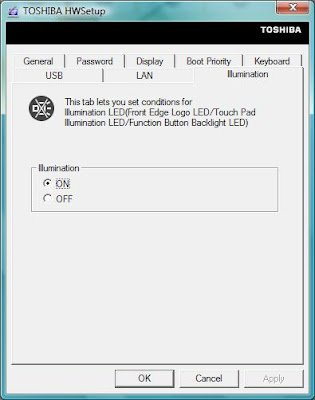
Not until a week that it already bored me to see my laptop lights up as if it was a festival. Then to my dismay, I found out that turning off the LEDs wasn't easy (I did manage to turn it off though).
My colleague buying the same laptop as mine, also find it difficult and he did ask me how.
Today, someone asked me (she's using toshiba also) how to turn the LED off and gladly I told her and write in this post on the how to.
1. Press fn button and click on the rightmost button
2. Click on the HWSetup button
3. Go to Illumination tab and select Off and click OK. You're done.
MD5 hash
This morning I read a blog discussing about how to keep a secure password. The usual way to store a password is first to hash it using MD5 hash and store it in a db. The benefit of using MD5 is you cannot do a reverse-hash.
Here's how you code it in Java :
To convert it in hex, here's the code (actually I got it from here):

One more tips, for better security, you might consider to add salt before hashing the password to make it less vulnerable. The changes looks like this :
"The salt" here should be created dynamically and stored it along with the hashed password to be used later.
An excellent post on secure password scheme could be found here.
Here's how you code it in Java :
MessageDigest md = java.security.MessageDigest.getInstance("MD5");
md.update("your password here");
byte[] hashed= md.digest();
To convert it in hex, here's the code (actually I got it from here):
One more tips, for better security, you might consider to add salt before hashing the password to make it less vulnerable. The changes looks like this :
md.update("The salt" + "your password here");"The salt" here should be created dynamically and stored it along with the hashed password to be used later.
An excellent post on secure password scheme could be found here.
Friday, May 22, 2009
Being critical with your own capacity
This post I think only relates to small company where employees are less than 30 ppl or where there're no strict structure applied.
It's about how people responses when they're given task while they're still working on one.
By far, I've seen 3 ways of ppl managing their capacity:
So which type is the best?
I would say a small company only needs 1 or 2 "Yes man" and a lot of "rational guy".
There are times where resources are limited and adding more resource is not the best solution. This is where "Yes man" is very helpful, however having too many "Yes man" won't be good either considering the quality of the work.
A growing company is a company which also learn to realize quality does come with price.
One caution for "rational guy", sometimes he might become too rational that he start to reject the task for the sake of task dislike using the current task as an excuse.
It's about how people responses when they're given task while they're still working on one.
By far, I've seen 3 ways of ppl managing their capacity:
- "Yes man" (or "can do guy")
This guy will say yes and confidently say I can to all the tasks given to him. Usually this type of guy is a smart guy, able to work everything fast and done as it seems. This guy is willing to sacrifice everything for the sake of finishing all the tasks. One thing I notice though, shortcuts were applied everywhere to get things done. The simple reason for this is there are a lot of tasks in hand, and as quickly as possible he wants to get rid of them all one by one. - Rational guy
This type of guy is the rational thinking one, when given a new task he will look at his capacity first and dare to say "I can't" if he's asked to finish the task using the time allocated for other task. Mostly guys with this type are a bit perfectionist, they have their argument that task should be finished in a right way, with few shortcuts (or none if possible). - Quiet guy
Given tasks beyond his capacity, he will keep quiet. He will keep on working on the tasks one by one, sadly without minding the time limit he has. The result is this guy will work overtime at most and doesn't meet the schedule. The quality of his work might not matter for him, he will keep on working and someday when he is tired enough, he will resign and start over in other place.
So which type is the best?
I would say a small company only needs 1 or 2 "Yes man" and a lot of "rational guy".
There are times where resources are limited and adding more resource is not the best solution. This is where "Yes man" is very helpful, however having too many "Yes man" won't be good either considering the quality of the work.
A growing company is a company which also learn to realize quality does come with price.
One caution for "rational guy", sometimes he might become too rational that he start to reject the task for the sake of task dislike using the current task as an excuse.
Thursday, March 19, 2009
Scheduling a project correctly? Almost impossible!
Scheduling a software project, I can't say that it's enjoyable. To say that it's complicated, risky and very unreliable task is agreeable for me. All the task durations set are all guestimate, basically based on hunches. After all, who can measure software development correctly. And to imagine that everything would go smooth is one thought that should never cross your mind.
The latest schedule that I arranged was a schedule for documentation project, actually it was a product reverse engineereed and documented. We have a client bought the product and they're interested in buying the source code along with the complete documentation.
At first, I thought for this project I was a bit lucky, no development needed. The thought that I forbid to cross my mind actually entered in. Thinking that documentation are all measureable, I began to arrange the schedule. The project started and after a month passed by, I begin to notice that problems start to creep in along with their surprises :
I hate the idea that working over hours is the only solution to finish the project on time. I prefer working smart, which are :
The project is still on its way, let's see whether we could finish the project on time or not :)
and whether the smart way will prevail over working over hours.
Before I finish, some books that I read also mentioned that software projects tend to not meet it's schedule, which I hope I could disagree with. These two books I would like to recommend : Secrets of Success Software and Mythical Man Month.
The latest schedule that I arranged was a schedule for documentation project, actually it was a product reverse engineereed and documented. We have a client bought the product and they're interested in buying the source code along with the complete documentation.
At first, I thought for this project I was a bit lucky, no development needed. The thought that I forbid to cross my mind actually entered in. Thinking that documentation are all measureable, I began to arrange the schedule. The project started and after a month passed by, I begin to notice that problems start to creep in along with their surprises :
- New things to be documented start to pop up, things that I didn't see in the first place.
- Tools that we used sometimes stressed us up, even M$Word! The documentation has reached almost 500 pages, when my team tried to format the doc sometimes it stopped working. And still not to mention other tools we used. Are we picking a wrong tools here? Nope, I don't think so. Problems definitely will be met whatever the tools we picked.
- Human resources. When one member of the team quits, it left a hole that couldn't be filled straight away.
- The skills required. Not everybody has the skill to document, create diagrams, read existing code.
- Interrupt. I have to help other project and what can I do but to assign my time to help.
I hate the idea that working over hours is the only solution to finish the project on time. I prefer working smart, which are :
- Finding patterns repeatedly used in the documentation. I'm lucky enough to have a teammate who is also able to recognize patterns repeatedly used in the documentation. Create/automate it once and solve it for all.
- Start measuring the time spent for a task and focus on working faster for the same task either by optimizing the way we work, finding the common things (i.e. pattern) or even using copy paste :)
- Spend less time on the normal working hours for other things we usually do (e.g. reading mails, newspaper, etc).
The project is still on its way, let's see whether we could finish the project on time or not :)
and whether the smart way will prevail over working over hours.
Before I finish, some books that I read also mentioned that software projects tend to not meet it's schedule, which I hope I could disagree with. These two books I would like to recommend : Secrets of Success Software and Mythical Man Month.
Tuesday, February 17, 2009
Running grails app in eclipse
Running grails app in eclipse actually is quite simple if... you know how.
Here's how :
- Import your grails app as existing project in eclipse
- Find {app-name}.launch in the project root and right click select Run As and the .launch configuration name
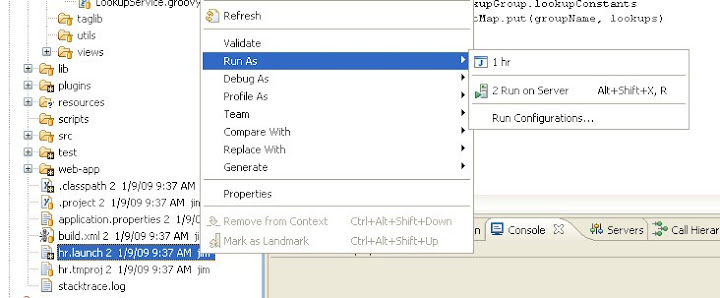
- There's all to it :)
If you want to know how to debug grails app, see my previous post.
Here's how :
- Import your grails app as existing project in eclipse
- Find {app-name}.launch in the project root and right click select Run As and the .launch configuration name
- There's all to it :)
If you want to know how to debug grails app, see my previous post.
Debugging Grails
Debugging grails almost got me crazy. I followed as said, trying it many times. At last google led me to this link which shed some light.
Let's get to the point, here's how to enable debugging grails (groovy) :
- Add JDK's tools.jar to your project build path.
Yep, that's all.
Or I'll be more specific here :
- Open your project properties, go to Java Build Path
- On tab Libraries, Add External JARs.
- Pick tools.jar from your {JDK_HOME}/lib
Fyi, I'm using grails 1.0.4 and groovy eclipse 1.5.7.20081120_2330.
Let's get to the point, here's how to enable debugging grails (groovy) :
- Add JDK's tools.jar to your project build path.
Yep, that's all.
Or I'll be more specific here :
- Open your project properties, go to Java Build Path
- On tab Libraries, Add External JARs.
- Pick tools.jar from your {JDK_HOME}/lib
Fyi, I'm using grails 1.0.4 and groovy eclipse 1.5.7.20081120_2330.
Tuesday, January 27, 2009
Extracting excel sheet index
First, this post has nothing to do with Java. It only serves as a reminder for me.
I was in the middle of documenting things where I have to use Excel with many sheets. The need for me is to have automatic numbering on each sheet, where the index depends on the sheet index (fortunate for me). Excel doesn't provide a function for retrieving index, I tried to put the index on the sheet name and further extract it. It works with the 1st excel file (because the other sheets were copied from the 1st sheet and excel voluntarily add index to the new copy's name), but with the 2nd excel file I don't want to put the index on the sheet name myself. The macro below (see this link) helps me on extracting the sheet index :

I was in the middle of documenting things where I have to use Excel with many sheets. The need for me is to have automatic numbering on each sheet, where the index depends on the sheet index (fortunate for me). Excel doesn't provide a function for retrieving index, I tried to put the index on the sheet name and further extract it. It works with the 1st excel file (because the other sheets were copied from the 1st sheet and excel voluntarily add index to the new copy's name), but with the 2nd excel file I don't want to put the index on the sheet name myself. The macro below (see this link) helps me on extracting the sheet index :
- Type above code.
- In Excel press Alt + F11 to enter the VBE.
- Press Ctrl + R to show the Project Explorer.
- Right-click desired file on left (in bold).
- Choose Insert -> Module.
- Paste code into the right pane.
- Press Alt + Q to close the VBE.
- Save workbook before any other changes.
Thursday, January 22, 2009
Javascript root objects available for webscript
In this post I'm quoting the wiki content for the sake of ease to find it later.
One link that might be of interest : Javascript API cookbook
One link that might be of interest : Javascript API cookbook
The following JavaScript root objects are available to all Web Scripts, regardless of their hosting environment.
- args
- an associative array of all URI parameters. See example.
- argsM
- an associative array of all URI parameters (where each key is an argument name and each value is an array containing all respective argument values, even if only one is supplied). See example.
- headers
- an associative array of all request headers.
- headersM
- an associative array of all request headers (where each key is an header name and each value is an array containing all respective header values, even if only one is supplied). See example.
- url
- provides access to the URI (or parts of the URI) that triggered the web script.
- model
- An empty associative array which may be populated by the JavaScript. Values placed into this array are available as root objects in Web Script response templates.
- status
- provides ability to control response status codes.
- cache
- provides ability to control caching of response.
- config
- provides access to the Web Script configuration.
- msg
- provides access to Web Script localized messages.
- format
- provides information on the response format to be rendered.
- guest
- A boolean indicating whether the web script is executing as "Guest".
- webscript
- An associative array of meta-data properties describing the Web Script.
- server
- An associative array of meta-data properties describing the server hosting the Web Script.
- jsonUtils
- A host object for parsing and generating JSON objects.
- atom
- A host object for parsing and generating Atom (Publishing) documents.
- logger
- A host object providing access to console logging facilities for debugging of scripts. See the Logging API.
Web Scripts hosted within the Alfresco Repository tier also have access to the following root objects which provide direct access to Repository services and content.
- roothome
- the repository root node (only available if authenticated)
- companyhome
- the company home folder (only available if authenticated)
- person
- the person node of the currently authenticated user (only available if authenticated)
- userhome
- the user home folder (only available if authenticated)
- search
- A host object providing access to Lucene and Saved Search results. See the Search API.
- people
- A host object providing access to Alfresco people and groups. See the People API.
- actions
- A host object providing invocation of registered Alfresco Actions. See the Actions API.
- session
- Session related information such as the current authentication ticket. See the Session API.
- classification
- Access to the root elements of the classification API. See the Classification API.
- utils
- Access to a library of useful helper functions not provided as part of generic JavaScript. See the Utility Functions.
- avm
- Access to WCM objects such as AVM paths and searching within AVM stores and web projects. See the AVM API.
- crossRepoCopy
- Cross repository copy support. See the Cross Repository Copy.
- workflow
- Start workflows and access, control in-flight workflows. See the JavaScript API#Workflow API.
Web Scripts hosted within the presentation tier (i.e. within Alfresco SURF) have their own extras as described in the Surf Platform - Freemarker Template and JavaScript API.
Wednesday, January 21, 2009
Thread safe singleton implementation
Singleton pattern is used in many projects I've gone through and I implemented it the same way in all the projects just like others did. Luckily for me the many projects could be safely assumed as thread safe projects. Thread safe project for me is a project where no thread programming is required. Before continuing, below is how I implemented singleton pattern.
public class SingletonClassic {
static SingletonClassic instance;
public static SingletonClassic getInstance() {
if (instance == null) {
instance = new SingletonClassic();
}
return instance;
}
}
I guess the code above should be familiar to programmers. Now, we delve into the reason of why I spend my time writing this blog. The code above is actually not thread safe, let's consider for example we have 2 threads running. Both are trying to access the singleton above (assume that the singleton isn't accessed yet), the 1st thread already pass the "if (instance == null) {" statement and the thread scheduler thinks that it's the 2nd thread time to run so the 1st thread got paused and the 2nd thread runs. 2nd thread arrive at the "if (instance == null) {" statement, the instance isn't instantiated yet so it enters into the if clause and create an instance and returns the instance. 2nd thread sleeps and 1st thread wakes up and continue where it left before which is creating another instance.
So, we have a Singleton which is not so Singleton. At this point we see no harm done but if you're a perfectionist, the problem above will annoy you :)
To ease you, here's the solution that I read in some article which unfortunately I forgot (very very unfortunate for me not to keep the link) :
public class SingletonClass {
public static SingletonClass getInstance() {
return SingletonHolder.getInstance();
}
static class SingletonHolder {
static SingletonClass instance;
static {
instance = new SingletonClass();
}
static SingletonClass getInstance() {
return instance;
}
}
}
I just go straight to the point here, the reason why the new code above is thread safe is because the static initializer is guaranteed to be thread safe in the jvm specification. It will be initialized only once when the class is loaded.
still confused? let me break it down :
1. SingletonClass.getInstance() is called
2. which in turn will call SingletonHolder.getInstance()
3. at this point static initializer in SingletonHolder will be executed where SingletonClass instance is initialized
4. the new SingletonClass instance is returned, the instance will not be instantiated twice. Guaranteed!
If I ever meet the article again, I will write the name of the guy who found this method here.
public class SingletonClassic {
static SingletonClassic instance;
public static SingletonClassic getInstance() {
if (instance == null) {
instance = new SingletonClassic();
}
return instance;
}
}
I guess the code above should be familiar to programmers. Now, we delve into the reason of why I spend my time writing this blog. The code above is actually not thread safe, let's consider for example we have 2 threads running. Both are trying to access the singleton above (assume that the singleton isn't accessed yet), the 1st thread already pass the "if (instance == null) {" statement and the thread scheduler thinks that it's the 2nd thread time to run so the 1st thread got paused and the 2nd thread runs. 2nd thread arrive at the "if (instance == null) {" statement, the instance isn't instantiated yet so it enters into the if clause and create an instance and returns the instance. 2nd thread sleeps and 1st thread wakes up and continue where it left before which is creating another instance.
So, we have a Singleton which is not so Singleton. At this point we see no harm done but if you're a perfectionist, the problem above will annoy you :)
To ease you, here's the solution that I read in some article which unfortunately I forgot (very very unfortunate for me not to keep the link) :
public class SingletonClass {
public static SingletonClass getInstance() {
return SingletonHolder.getInstance();
}
static class SingletonHolder {
static SingletonClass instance;
static {
instance = new SingletonClass();
}
static SingletonClass getInstance() {
return instance;
}
}
}
I just go straight to the point here, the reason why the new code above is thread safe is because the static initializer is guaranteed to be thread safe in the jvm specification. It will be initialized only once when the class is loaded.
still confused? let me break it down :
1. SingletonClass.getInstance() is called
2. which in turn will call SingletonHolder.getInstance()
3. at this point static initializer in SingletonHolder will be executed where SingletonClass instance is initialized
4. the new SingletonClass instance is returned, the instance will not be instantiated twice. Guaranteed!
If I ever meet the article again, I will write the name of the guy who found this method here.
Problem with subclipse and tortoisesvn
If you use subclipse and tortoisesvn on the same checkout folder on your machine, you might got this exception while working with subclipse :
"svn: This client is too old to work with working copy"
The reason is your tortoisesvn is using the latest svn version to perform some actions on the checkout folder.
The solution is to replace libsvnjavahl-1.dll in your [eclipse-root]/plugins/org.tigris.subversion.javahl.win32_1.1.0 with the latest one found in the zip file on this link.
I guess that's all that I did on my machine.
"svn: This client is too old to work with working copy"
The reason is your tortoisesvn is using the latest svn version to perform some actions on the checkout folder.
The solution is to replace libsvnjavahl-1.dll in your [eclipse-root]/plugins/org.tigris.subversion.javahl.win32_1.1.0 with the latest one found in the zip file on this link.
I guess that's all that I did on my machine.
Wednesday, December 24, 2008
The Helicopter story
I just read a nice article (check this link), it spoke about the principle of orthogonality in software design. Without further ado, here's the helicopter story.
A helicopter has four main controls: foot pedals, collective pitch lever, cyclic, and throttle. The foot pedals control the tail rotor. With the foot pedals you can counteract the torque of the main blade and, basically, point the nose where you want the helicopter to go. The collective pitch lever, which you hold in your left hand, controls the pitch on the rotor blades. This lets you control the amount of lift the blades generate. The cyclic, which you hold in your right hand, can tip one section of the blade. Move the cyclic, and the helicopter moves in the corresponding direction. The throttle sits at the end of the pitch lever.
A helicopter has four main controls: foot pedals, collective pitch lever, cyclic, and throttle. The foot pedals control the tail rotor. With the foot pedals you can counteract the torque of the main blade and, basically, point the nose where you want the helicopter to go. The collective pitch lever, which you hold in your left hand, controls the pitch on the rotor blades. This lets you control the amount of lift the blades generate. The cyclic, which you hold in your right hand, can tip one section of the blade. Move the cyclic, and the helicopter moves in the corresponding direction. The throttle sits at the end of the pitch lever.
It sounds fairly simple. You can use the pedals to point the helicopter where you want it to go. You can use the collective to move up and down. Unfortunately, though, because of the aerodynamics and gyroscopic effects of the blades, all these controls are related. So one small change, such as lowering the collective, causes the helicopter to dip and turn to one side. You have to counteract every change you make with corresponding opposing forces on the other controls. However, by doing that, you introduce more changes to the original control. So you're constantly dancing on all the controls to keep the helicopter stable.
That's kind of similar to code. We've all worked on systems where you make one small change over here, and another problem pops out over there. So you go over there and fix it, but two more problems pop out somewhere else. You constantly push them back—like that Whack-a-Mole game—and you just never finish. If the system is not orthogonal, if the pieces interact with each other more than necessary, then you'll always get that kind of distributed bug fixing.
The funny thing about the helicopter story is that I'm not a helicopter pilot. When I wrote the helicopter story, I wanted to make sure it was accurate. I knew of a USENET group on helicopters, so I posted the helicopter story saying, "This is what I'm intending to write about how helicopter controls work. Is it correct? A helicopter pilot emailed me and said, "I read what you wrote about controlling helicopters. I didn't sleep all night." 
Wednesday, December 17, 2008
Add index to your table to speed up queries
I'm not a database expert here and I just learned this tip today.
If you have a large table and one or more columns are often used in the where clause, you might want to consider setting up index for those columns.
But one thing to note, in oracle (maybe for other database also), if you're doing a calculation on the column in the where clause, your index isn't used by the optimizer.
e.g. where column * 12 > 1000
My friend today was trying to optimize a query, by introducing an index, the result was awesome, instead of doing a full table scan (the size around 60 something mb), the optimizer use the index thereby reducing the cost and the time consumed.
One other option that was set is to allow the database engine to execute parallel queries on the table.
But if we setup too many indices, will that make inserting record to the table much slower?
If you have a large table and one or more columns are often used in the where clause, you might want to consider setting up index for those columns.
But one thing to note, in oracle (maybe for other database also), if you're doing a calculation on the column in the where clause, your index isn't used by the optimizer.
e.g. where column * 12 > 1000
My friend today was trying to optimize a query, by introducing an index, the result was awesome, instead of doing a full table scan (the size around 60 something mb), the optimizer use the index thereby reducing the cost and the time consumed.
One other option that was set is to allow the database engine to execute parallel queries on the table.
But if we setup too many indices, will that make inserting record to the table much slower?
Tuesday, December 16, 2008
Beans that you could access from your dashlet in alfresco
If you're developing a custom dashlet or any jsf page for any purpose in alfresco, you could use the beans listed in (alfresco\WEB-INF\faces-config-beans.xml).
Here's the list :
I can't believe that the list is so long that it even make me think to create a small program to load the xml file and parse it just to get this list :)
Anyway, bottom line is these beans might help you, knowing that they're exist already a help.
Here's the list :
- MultilingualManageDialog (The bean for the Delete Category screen)
- ManagePermissionsDialog (The bean for the Manage Permissions)
- MakeMultilingualDialog (The bean that make a document multilingual)
- EditMLContainerDialog (The bean that edit the multilinguals properties of a document)
- AddTranslationWithoutContentDialog (The bean that add a new translation without content)
- AddTranslationDialog (The bean that add a translation with a content)
- LoginBean (The bean that backs up the Login screen)
- NavigationBean (The bean that holds navigation state)
- BrowseBean (The bean that holds folder browse state)
- AboutBean (Bean that provides information for the About page)
- DialogManager (Bean that manages the dialog framework)
- WizardManager (Bean that manages the wizard framework)
- CreateSpaceDialog (The bean that backs up the Create Space Dialog)
- CreateSpaceWizard (The bean that backs up the Create Space Wizard)
- DeleteSpaceDialog (The bean that backs up the Delete Space Dialog)
- ClipboardBean (The bean that manages a users Clipboard state)
- RecentSpacesBean (The bean that manages the state for the Recent Spaces Shelf component)
- UserShortcutsBean (The bean that manages the state for the User Shortcuts Shelf component)
- SearchProperties (The bean that holds a state for the Advanced Search screen)
- AdvancedSearchDialog (The bean that holds a state for the Advanced Search screen)
- UsersBeanProperties (The bean that holds state for the Users screen)
- UsersDialog (The bean that holds state for the User Management screens)
- GroupsDialog (The bean that holds state for the Groups Management screens)
- CategoriesProperties (The bean that holds state for the Category Management screens)
- CategoriesDialog (The bean that holds state for the Category Management screens)
- EditSpaceDialog (The bean that backs up the Edit Space Dialog)
- AddContentDialog (The bean that backs up the Add Content Dialog)
- CreateContentWizard (The bean that backs up the Create Content Wizard)
- EditContentWizard (The bean that backs up the Edit Content Wizard)
- ViewContentPropertiesDialog (The bean that backs up the View Content Properties Dialog)
- SetContentPropertiesDialog (The bean that backs up the Set Content Properties Dialog)
- ..........
- WorkflowBean
- and a lot more....
I can't believe that the list is so long that it even make me think to create a small program to load the xml file and parse it just to get this list :)
Anyway, bottom line is these beans might help you, knowing that they're exist already a help.
Monday, December 15, 2008
Alfresco tips
The tips that I will write here might seem silly but it works for me and I do hope it will help someone else and... I think I'll continue to add more items on this list someday.
Should we start now? :)
This is it for the moment, more to come later.
Should we start now? :)
- Always read the wiki thoroughly, sometimes one page won't help you, other pages might contain the information you might need (sometimes I feel they're scattered and I just have to gather them pieces by pieces).
- Read the existing code/example, it will certainly help you. For example, if you're creating a dashlet, look at the other dashlets already available.
- In case you need to go deep (read : debugging alfresco), you could try to download the code, build it and run it :)
- In case the above is too difficult, you could try to at least get the source and put it in a project in eclipse (or any IDE) and remotely debug alfresco (see my post) .
- If you need to debug the workflow, get jBPM source code and do the same thing as no 4.
- Do yourself a favour by writing down all the changes you've done in alfresco in case you need to revisit it later, I can assure you that you won't be able to remember it for long (unless you're playing with alfresco everyday :).
- If you're creating a custom workflow and at some point in your workflow you need to make a branch based on some properties value, use a decision node.
- If you're creating a custom workflow, you might need to consider reading jbpm's documentation, especially on the jpdl chapter
- Use jpdl designer (free!!) to build your workflow, it will do you a favour later when you come back to your workflow. Go to http://www.eclipse.org or download jBPM GPD.
This is it for the moment, more to come later.
Monday, November 24, 2008
Alfresco workflow package actions
I'm writing this post to serve as a reminder for later need because it's a bit difficult to look for it in Alfresco documentation "jungle" :) (no offense, I'm still grateful that I could access Alfresco's documentation).
Each workflow instance in Alfresco works against a document, the start task "submit" the document, the other tasks in the workflow might add another document, edit attached document, remove attached document and only allowed to read the attached document. This behaviour is set in the workflow model by overriding bpm:packageActionGroup and bpm:packageActionItemGroup.
List of action groups available by default :
Sample model definition which overrides the default action.
I guess this is enough for now.
Each workflow instance in Alfresco works against a document, the start task "submit" the document, the other tasks in the workflow might add another document, edit attached document, remove attached document and only allowed to read the attached document. This behaviour is set in the workflow model by overriding bpm:packageActionGroup and bpm:packageActionItemGroup.
List of action groups available by default :
- read_package_item_actions
allow viewing of package items - edit_package_item_actions
above + allow modification (edit, checkout, ...) of package items - edit_and_remove_package_item_actions
above + allow removal of package items - remove_package_item_actions
allow removal (but not modification) of package items - add_package_item_actions
allow addition of new package items
Sample model definition which overrides the default action.
<type name="mynamespace:taskname">
    <parent>bpm:workflowTask</parent>
    <overrides>
       <property name="bpm:packageActionGroup">
          <default>add_package_item_actions</default>
       </property>
       <property name="bpm:packageItemActionGroup">
          <default>edit_package_item_actions</default>
       </property>
    </overrides>
</type>
I guess this is enough for now.
Passing values to your freemarker template in alfresco
This story started when my teammate needed the value of JSESSIONID from alfresco and bla bla bla... So, in short, this is how I managed to pass the session id.
That's all, I guess I have to sleep now, already late...
Reference :
- Create a simple model (javabean class) to pass the value to the template, in the class create a method to return a Map containing the values needed, the keys used to store the values are the keys that will be accessed in the template.
- Register the class as a managed bean in WEB-INF/faces-config-custom.xml (pasting the content here is a bit difficult, until I know how to easily paste an xml content to the post I might not post it). Actually it's not that difficult to register a managed bean, just look at the sample in faces-config-beans.xml.
- Use the bean name as the model passed to the template.
- Access the value in the template, just like the way default values provided by alfresco are accessed.
public Map getTemplateModel() {
Map result = new HashMap();

result.put("sessionId", getSessionId());

return result;
}
<managed-bean>
 <description>
    Helper bean providing access to http servlet request's related properties
            and many other things.
 </description>
 <managed-bean-name>SanzModel</managed-bean-name>
 <managed-bean-class>com.sanz.model.TemplateModel</managed-bean-class>
 <managed-bean-scope>session</managed-bean-scope>
</managed-bean>
<r:template template="/alfresco/templates/elnusa/elnusa.html.ftl" model="#{Elnusa.templateModel}"/>That's all, I guess I have to sleep now, already late...
Reference :
Subscribe to:
Posts (Atom)